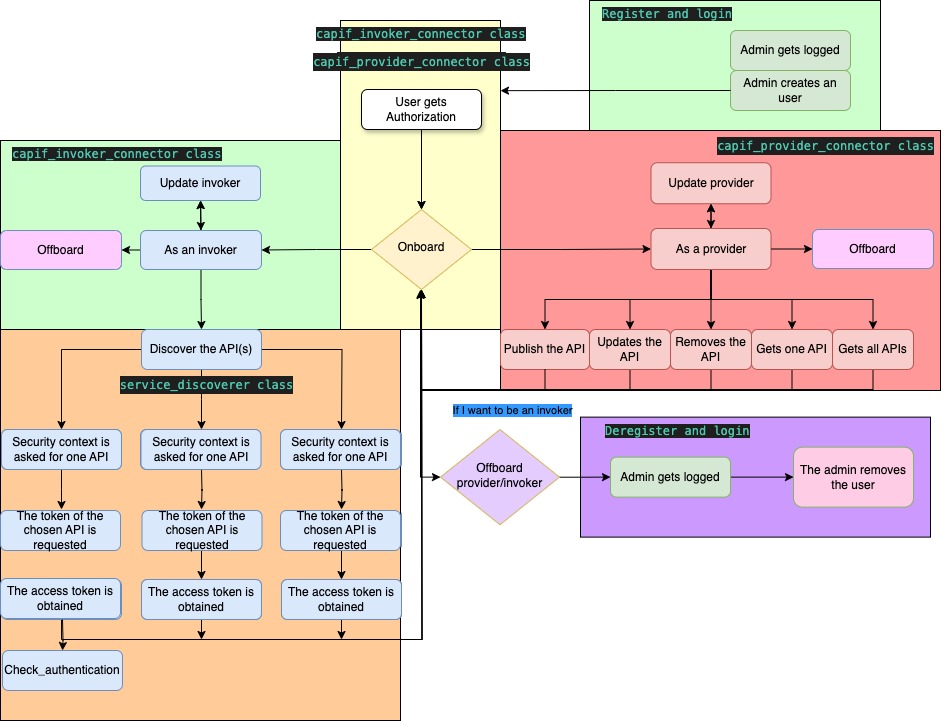
OpenCAPIF SDK full documentation
The OpenCAPIF SDK facilitates the integration of applications with the CAPIF NF. It offers various features for manual usage, automated scripting, and direct integration into application code.
This documentation provides a step-by-step guide for utilizing the SDK, detailing its functionalities. Before proceeding, ensure all prerequisites are met, and review the available testing modes for the SDK.
Getting Started
Before using the SDK, the following steps should be completed:
- Meet the requirements,
- Follow the installation instructions,
- Configure the SDK by completing the relevant sections in the configuration guide, depending on the CAPIF role the Network App will assume.
Available SDK Usage Modes
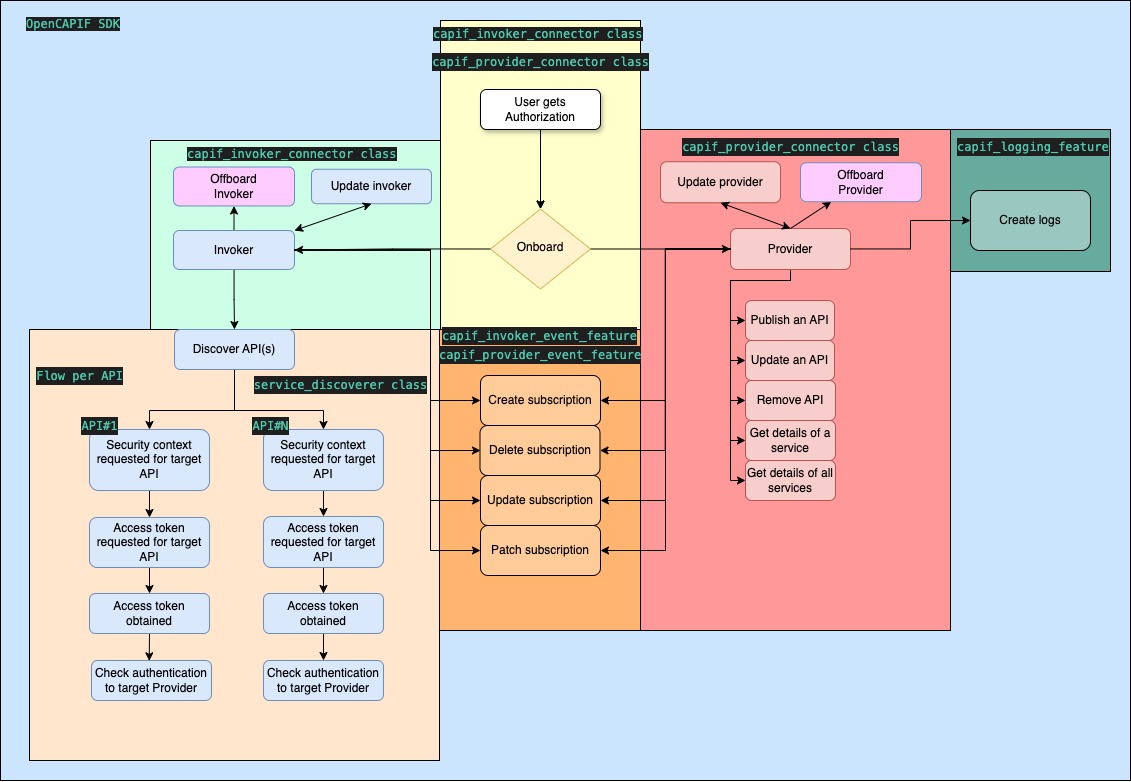
The repository provides two modes for utilizing the OpenCAPIF SDK:
-
Development Mode: The SDK can be imported directly into code for development purposes. Sample applications using the SDK are available in the network_app_samples folder.
-
Manual Mode: A set of Python scripts can be used to manually test each integration step. For manual usage, it is necessary to complete the utilities file with absolute paths from the target environment to finalize SDK configuration.
IMPORTANT: All SDK configuration files must be filled out based on the intended role and features. Further details can be found in the Configuration Section.
NOTE: The register file is not required for SDK usage, only for SDK consumers that wish to create their capif_username.
Provider Network App
The OpenCAPIF SDK enables efficient implementation of invoker functionality for Network App. This section details the SDK features related to CAPIF providers.
Important Information for Providers
Within the provider_folder, directories are created based on the registered capif_username. Each folder contains:
provider_service_ids.json: Contains all APFs and AEFs IDs onboarded with the associated username.capif_<api_name>_<api_id>_api.json: Stores the last payload for any published or updated API.service_received.json: Stores responses for Get API or Get All APIs.provider_capif_ids.json: A list of currently published APIs along with their IDs.
All the configuration values are available within the object capif_provider_connector.
The provider_capif_ids variable stores the provider_service_ids.json content in a dictionary form.
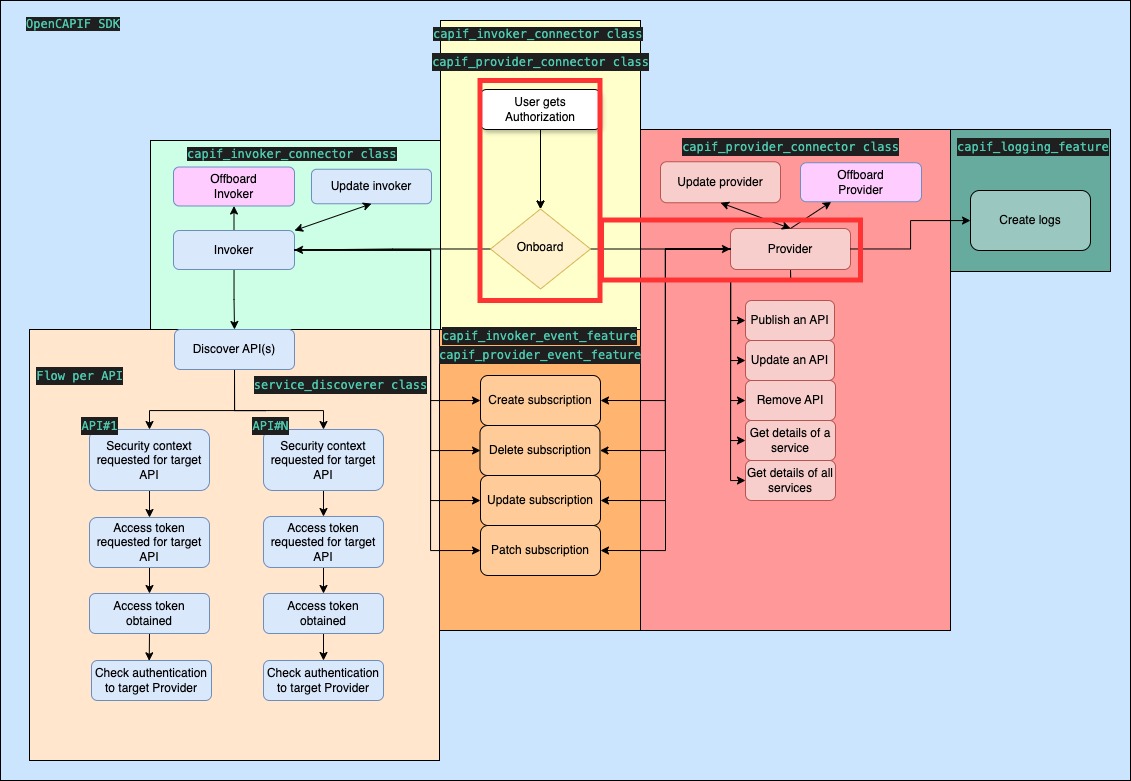
Provider Onboarding
OpenCAPIF SDK references:
- Function:
onboard_provider(supp_features) - Script:
provider_capif_connector.py
The SDK simplifies the onboarding process, allowing providers to register multiple APFs and AEFs. All APFs, AEFs, and AMF certificates are created and stored in provider_service_ids.json.
supp_features parameter is optional and it stands for communicating to the CCF the supported features. Its default value it's 0.
Service Publishing
OpenCAPIF SDK references:
- Function:
publish_services() - Script:
provider_publish_api.py
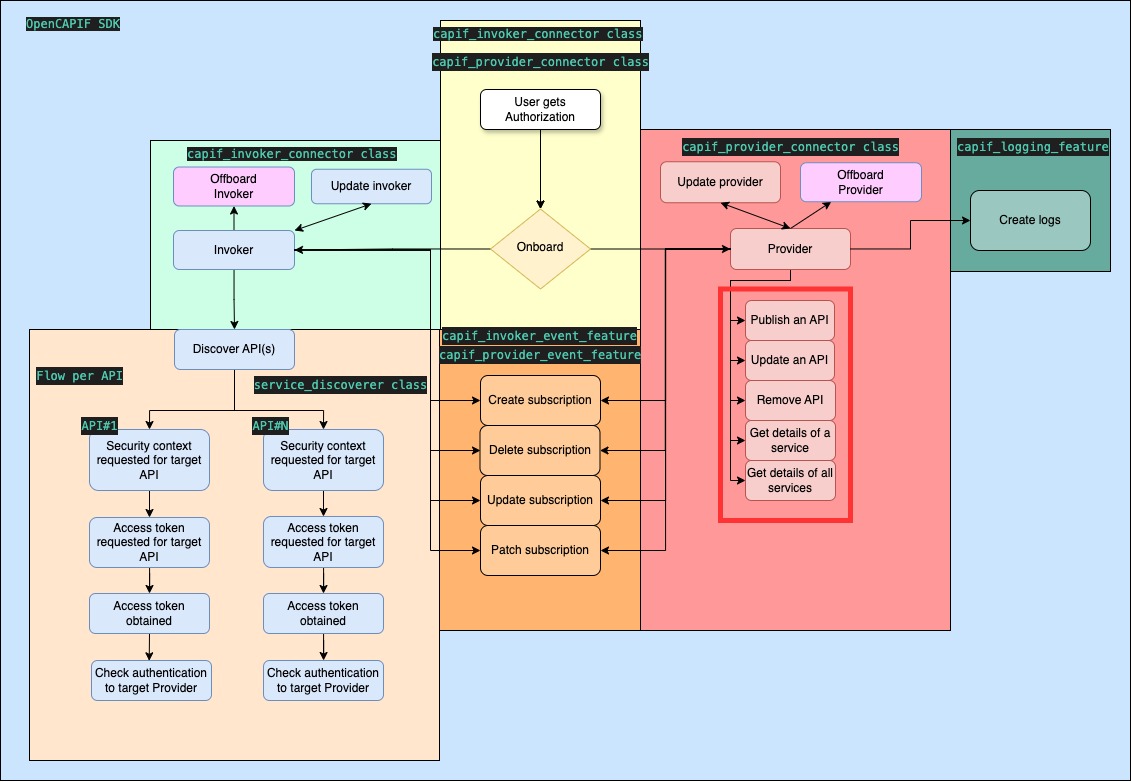
The SDK streamlines API publishing with the option to select specific APFs and AEFs. A copy of the uploaded API is stored in capif_<api_name>_<api_id>_api.json, and the provider_capif_ids.json is updated with the API name and its ID.
It is also important to have previously prepared the API schema description file of the API to be published. This file must follow the CAPIF_Publish_Service_API 3GPP specification.
To obtain this schema, opencapif_sdk has a facility to translate Openapi structures to ServiceAPIDescription schemas. More information: Translator functionality
Important: The SDK will automatically add in the custom operations, within the API description path, the capabilities for exposing the AEF_security methods. The developer must code this API endpoints.
Required SDK inputs:
- publisher_apf_id
- publisher_aefs_ids
- api_description_path
Service Deletion
OpenCAPIF SDK references:
- Function:
unpublish_service() - Script:
provider_unpublish_api.py
The SDK simplifies API deletion. Service deletion requires prior onboarding and service publication.
Required SDK inputs:
- publisher_apf_id
- publisher_aefs_ids
- service_api_id
Service Update
OpenCAPIF SDK references:
- Function:
update_service() - Script:
provider_update_api.py
This function enables to update a previously registered API. Selecting APFs and AEFs is possible. Onboarding and service publishing are prerequisites.
Required SDK inputs:
- service_api_id
- publisher_apf_id
- publisher_aefs_ids
Get Services
OpenCAPIF SDK references:
- Function:
get_service() - Script:
provider_get_published_api.py
Retrieve information of a previously published service, stored in service_received.json. Prior onboarding and service publication are necessary.
The function also returns the service API description received from CAPIF.
Required SDK inputs:
- service_api_id
- publisher_apf_id
Get All Services
OpenCAPIF SDK references:
- Function:
get_all_services() - Script:
provider_get_all_published_api.py
Retrieve information about all previously published services in service_received.json. Ensure you are onboarded as a provider and have published services.
The function also returns the service API descriptions received from CAPIF.
Required SDK input:
- publisher_apf_id
Update and Offboard Provider
OpenCAPIF SDK references:
- Functions:
update_provider(supp_features)andoffboard_provider() - Scripts:
provider_capif_connector_update.pyandprovider_capif_connector_offboarding.py
update_provider(supp_features): The provider updates his features such as APFs, AEFs, etc...
offboard_provider(): The provider offboards from CAPIF, this will cause the erase of the published APIs that were currently exposed.
supp_features parameter is optional and it stands for communicating to the CCF the supported features. Its default value it's 0.
The provider must be onboarded before using these features.
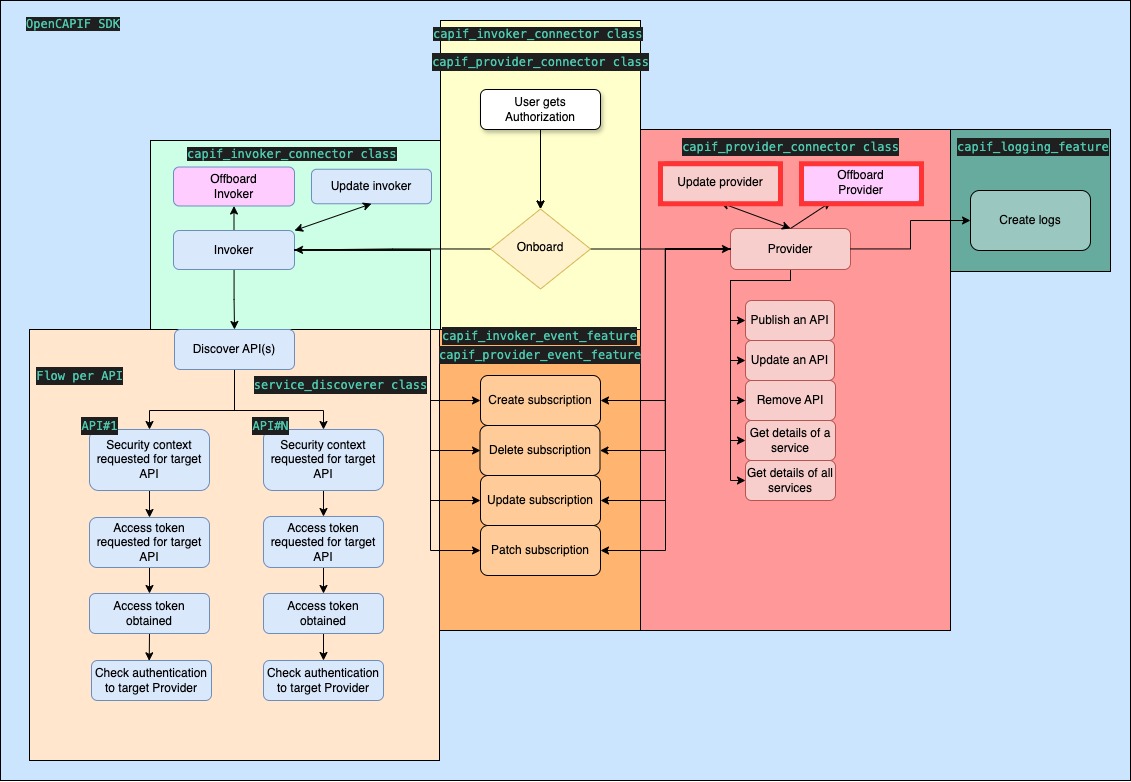
Create logs
OpenCAPIF SDK references:
- Function:
create_logs(aefId, jwt, supp_features)
The provider notifies to the CCF that the published API has been used by certain invoker.
supp_features parameter is optional and it stands for communicating to the CCF the supported features. Its default value it's 0.
For leveraging this feature the Provider must have onboarded and published an API previously.
Required SDK input:
- aefId (Within the function)
- jwt (Within the function)
- log (Within SDK configuration or object)
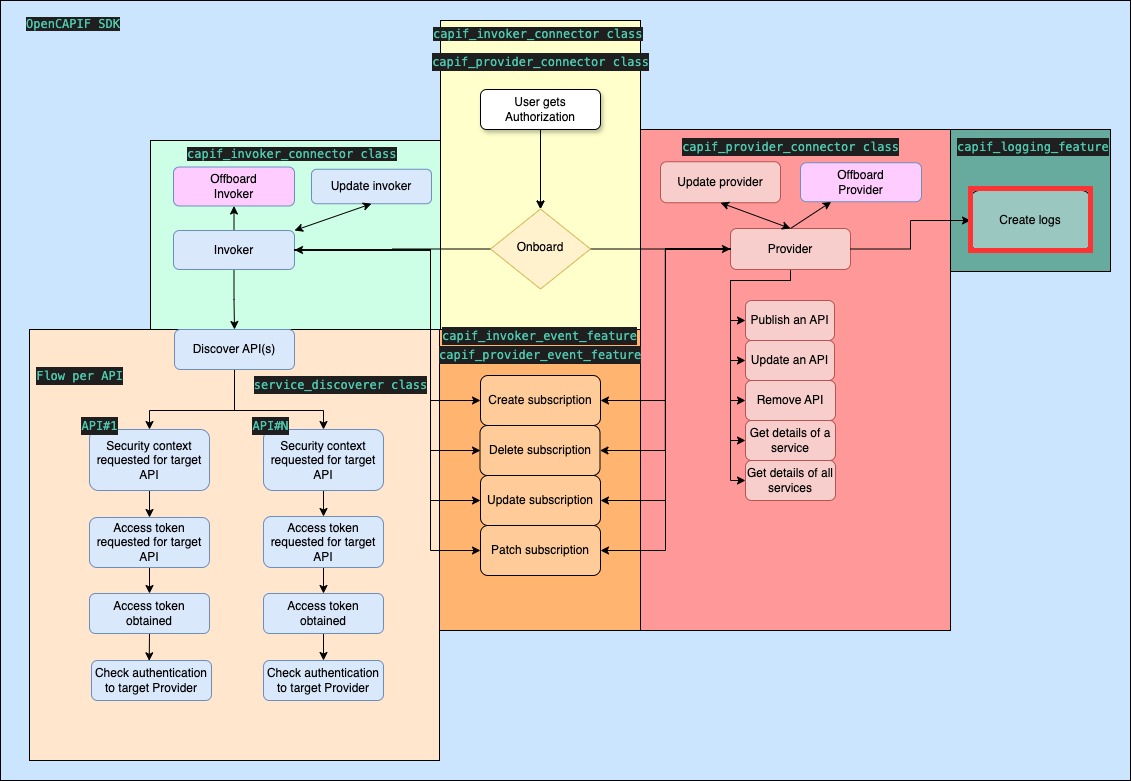
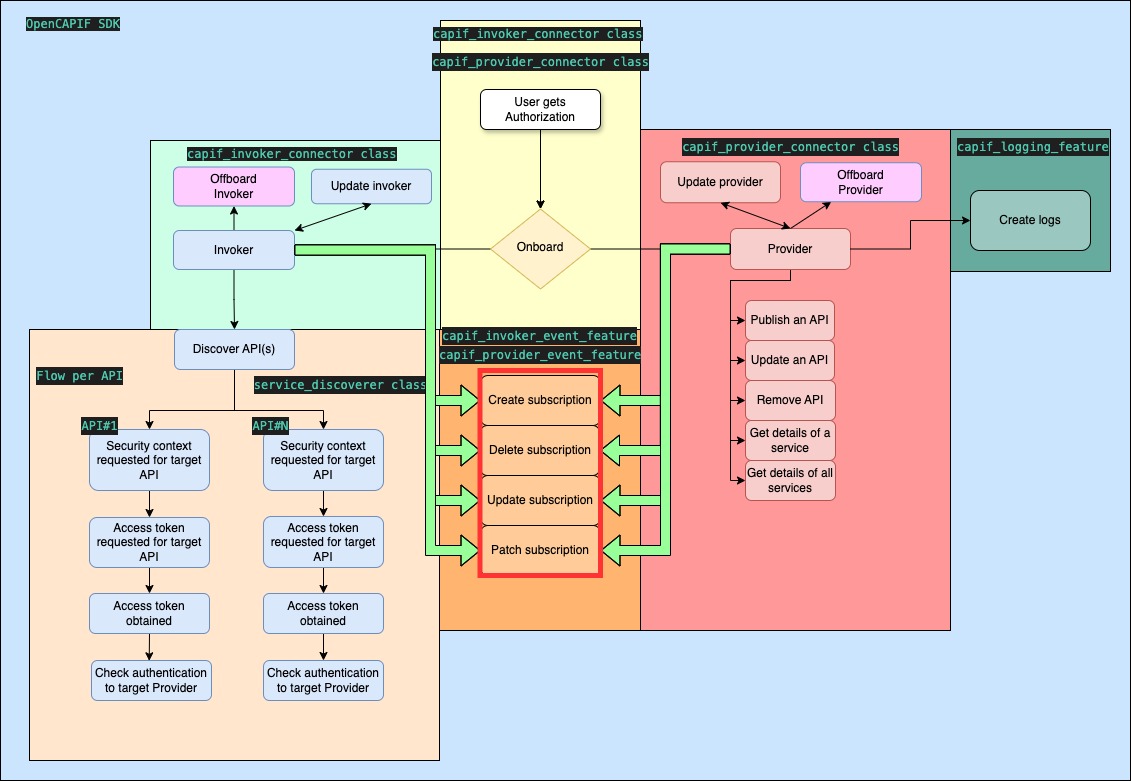
Create subscription
OpenCAPIF SDK references:
- Function:
create_subscription(name, id, supp_features)
The provider ask to the CCF about notifications related to services such as SERVICE_API_AVAILABLE or API_INVOKER_UPDATED.
supp_features parameter is optional and it stands for communicating to the CCF the supported features. Its default value it's 0.
This services are specificated in CAPIF Events API management explained in SDK configuration
For leveraging this feature the Provider must have onboarded previously.
The function returns the CAPIF ID of the new subscription, which is also stored in capif_subscriptions_id.json with the given name.
Errors: the subscription functions raise an exception when they fail: the requests exception (e.g. HTTPError) if CAPIF rejects the request, and EventSubscriptionError if the subscription name is not found, CAPIF does not return the subscription ID, or the invoker has not been onboarded.
Required SDK input:
- aefId//apfId//amfId (Within the function)
- name: An arbitrary name we want to set in order to store it.
- events (Within SDK configuration or object)
Delete subscription
OpenCAPIF SDK references:
- Function:
delete_subscription(name, id)
The provider ask to the CCF to withdraw the subscription to the notifications asked previously
For leveraging this feature the Provider must have onboarded and created a subscription previously.
Required SDK input:
- aefId//apfId//amfId (Within the function)
- name: The name of your subscription.
Update subscription
OpenCAPIF SDK references:
- Function:
update_subscription(name, id, supp_features)
The provider ask to the CCF about updating the subscription for receiving different services such as SERVICE_API_AVAILABLE or API_INVOKER_UPDATED, changing the URL for receiving the notifications...
This services are specificated in CAPIF Events API management explained in SDK configuration
supp_features parameter is optional and it stands for communicating to the CCF the supported features. Its default value it's 0.
For leveraging this feature the Provider must have onboarded and created a subscription previously.
Available from OpenCAPIF Release 2.0 onwards
Required SDK input:
- aefId//apfId//amfId (Within the function)
- name: The name of your subscription.
- events (Within SDK configuration or object)
Patch subscription
OpenCAPIF SDK references:
- Function:
patch_subscription(name, id, supp_features)
The provider ask to the CCF about updating the subscription for receiving different services such as SERVICE_API_AVAILABLE or API_INVOKER_UPDATED.
supp_features parameter is optional and it stands for communicating to the CCF the supported features. Its default value it's 0.
This services are specificated in CAPIF Events API management explained in SDK configuration
For leveraging this feature the Provider must have onboarded and created a subscription previously.
Available from OpenCAPIF Release 2.0 onwards
Required SDK input:
- aefId//apfId//amfId (Within the function)
- name: The name of your subscription.
- events (Within SDK configuration or object)
Invoker Network App
The OpenCAPIF SDK enables efficient implementation of invoker functionality for Network App. This section details the SDK features related to CAPIF invokers.
Important Information for Invokers
Within the invoker_folder, directories are created based on the registered capif_username. These directories contain:
capif_api_security_context_details-<capif_username>.json: Stores details about the invoker, including:api_invoker_id- Discovered APIs and their information (if Service Discovery has been used)
- JWT access tokens for discovered APIs (if Service Get Token functionality has been used)
The token variable is also available for retrieving the JWT token after the get_tokens() functionality.
The invoker_capif_details variable stores the capif_api_security_context_details-<capif_username>.json content.
Invoker onboarding
OpenCAPIF SDK references:
- Function:
onboard_invoker(supp_features) - Script:
invoker_capif_connector.py
The SDK streamlines the invoker onboarding process, storing the api_invoker_id in the capif_api_security_context_details-<capif_username>.json.
supp_features parameter is optional and it stands for communicating to the CCF the supported features. Its default value it's 0.

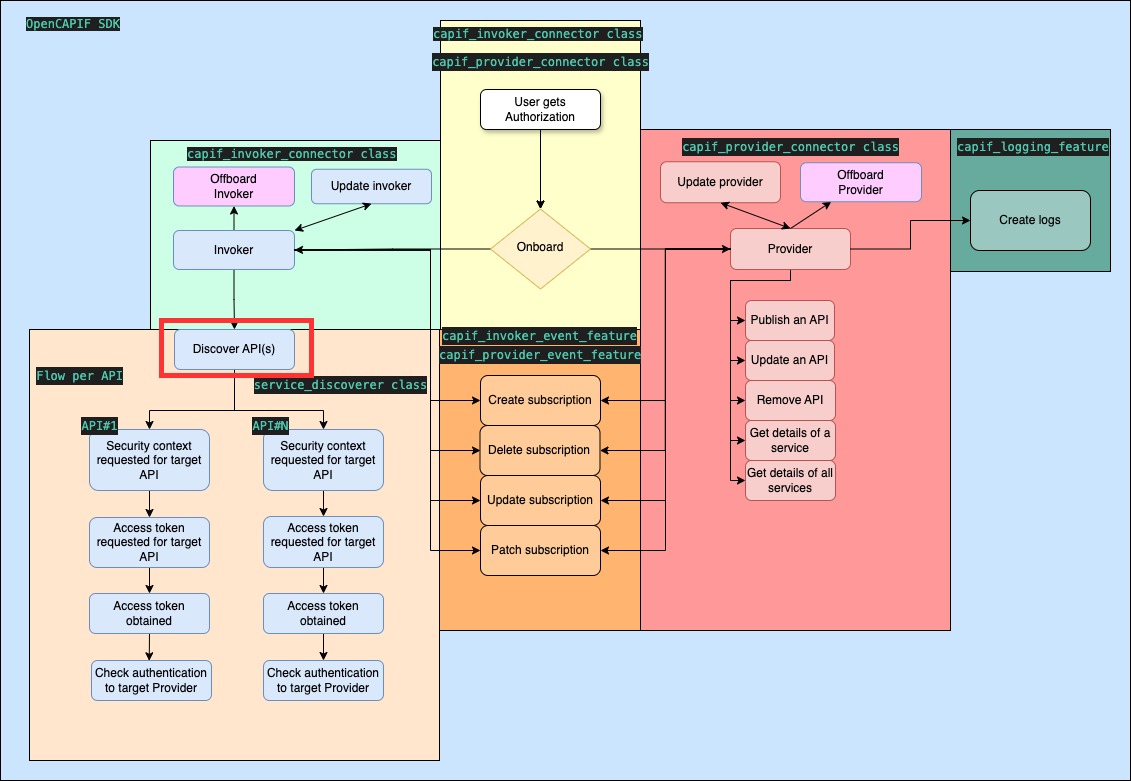
Service Discovery
OpenCAPIF SDK references:
- Function:
discover() - Script:
invoker_service_discovery.py
The discover_filter can be used to retrieve access to APIs. The invoker must be onboarded before using this function. Discovered APIs and their information are stored in capif_api_security_context_details-<capif_username>.json.
The function also returns the response of CAPIF, whose serviceAPIDescriptions field lists the discovered APIs, or None if no API was found.
Note: Creating the service_discoverer requires the mandatory security_context.pref_security_context setting of the invoker configuration, used in the Security Context step.
Use the discover_filter to retrieve access to target APIs. Ensure you are onboarded as an invoker before using this feature.
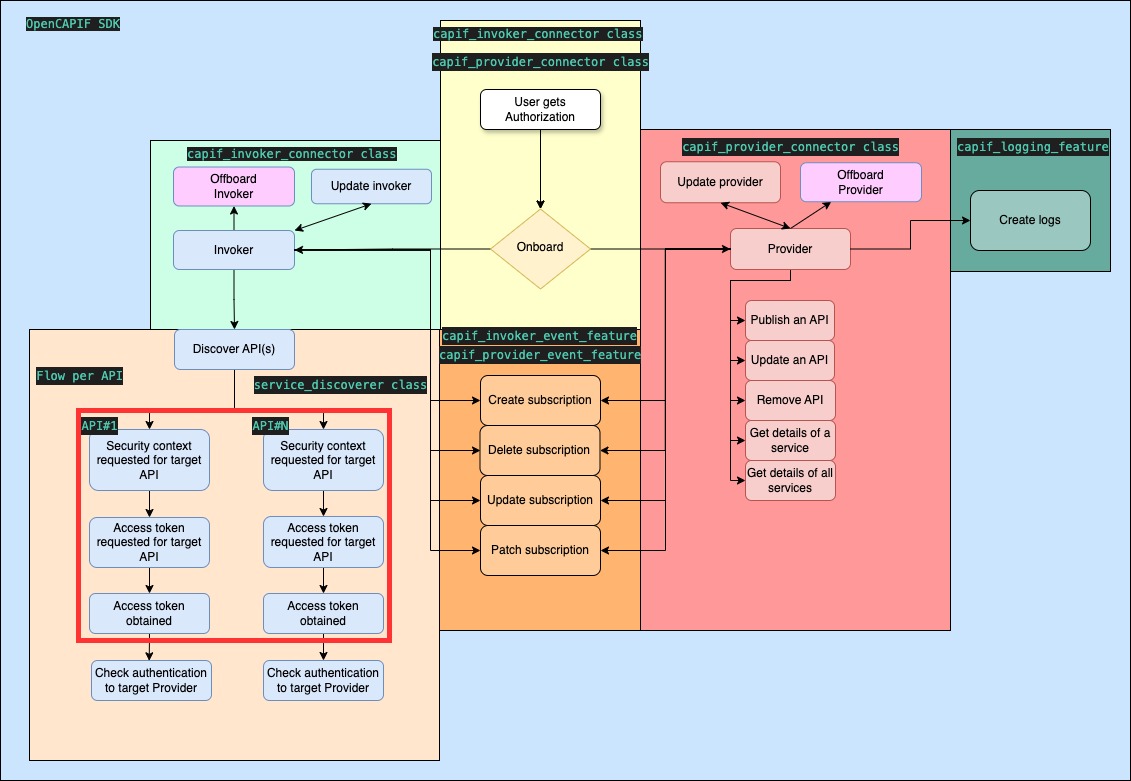
Security Context
OpenCAPIF SDK references:
- Function:
get_security_context(supp_features)
Registers or updates the invoker's security context in CAPIF for all the discovered APIs, requesting for each of them the security methods set in the mandatory security_context.pref_security_context setting of the invoker configuration (at least one of OAUTH, PKI and PSK, in order of preference). It is called automatically by get_tokens(), and it can also be called on its own to check the security context before requesting tokens. If PSK is one of the preferred methods, the request is sent over TLS 1.2, and the SDK derives the keys of the APIs for which CAPIF selects PSK (see PSK security method).
The function returns the security context returned by CAPIF. Its securityInfo field shows, for each API, the security method selected by CAPIF (selSecurityMethod):
security_context = service_discoverer.get_security_context(supp_features="0")
for security_info in security_context["securityInfo"]:
    print(security_info["apiId"], security_info["selSecurityMethod"])
supp_features parameter is optional and it stands for communicating to the CCF the supported features. Its default value it's 0.
Note: The first time the security context is set up for a CAPIF user, a 404 warning is shown, because the SDK tries to update the security context before registering it. This is expected, and the SDK then registers the security context.
Required SDK inputs:
- security_context.pref_security_context (or the
INVOKER_SECURITY_CONTEXT_PREF_SECURITY_CONTEXTenvironment variable)
Obtain JWT Tokens
OpenCAPIF SDK references:
- Function:
get_tokens(supp_features)andget_access_token_by_api_name(api_name, aef_id, force_refresh) - Script:
invoker_service_get_token.py
get_tokens() sets up the security context of the invoker and requests one JWT access token for all the discovered APIs for which CAPIF selected the OAUTH security method (the APIs with PKI or PSK do not use tokens). The token is stored in the token variable and in capif_api_security_context_details-<capif_username>.json, together with its expiration time (access_token_expires_at). If no discovered API uses OAUTH, no token is requested and the function returns None.
get_access_token_by_api_name() returns a token valid only for one API at one AEF (aef_id is required if several AEFs expose the API). These tokens are cached, also in the invoker details file, and renewed automatically when they are about to expire. invoke_api() uses them, so this function is only needed to call an API on your own.
supp_features parameter is optional and it stands for retrieve the token of the services that have certain supported features. Its default value is 0.
Invoke APIs
OpenCAPIF SDK references:
- Function:
invoke_api(api_name, method, resource, path, body, params, headers, path_params, aef_id, api_version, verify, timeout)andget_api_session(api_name, aef_id, verify, timeout)
Invokes a discovered API with the security method selected by CAPIF for it in the security context, which is created automatically if it does not exist yet:
- OAUTH: the request includes
Authorization: Bearer <token>, with a token valid only for that API. The token is renewed when it expires, and also once if the AEF answers401. - PKI: mutual TLS with the certificate obtained when onboarding the invoker.
- PSK: TLS-PSK with a key derived from the security context, described in PSK security method below. It requires Python 3.13 or later and OpenCAPIF 5.1.0 or later.
The address of the AEF is taken from the discovered API: its interfaceDescriptions (fqdn, ipv4Addr or ipv6Addr, port and apiPrefix; port 443 if it is not set) or its domainName. Requests always use HTTPS, and the AEF certificate is verified with the CAPIF CA root by default (see api_invocation.ca_cert in the configuration, or the verify parameter).
response = service_discoverer.invoke_api(
    api_name="6G-resilience",
    method="GET",
    resource="RESILIENCE_SINGLE",    # a published resourceName, whose URI is /resilience/{profileId}
    path_params={"profileId": 1},
    aef_id="AEF...",                 # required if several AEFs expose the API
)
print(response.json())
Use path instead of resource to call any path of the AEF, body to send a JSON body, and params and headers for query parameters and additional headers. For more control (several requests, files, streaming...), get_api_session() returns a requests session already configured for the API, which sends relative paths to the AEF:
with service_discoverer.get_api_session("6G-resilience", aef_id="AEF...") as session:
    session.post("/resilience", json={"profileId": 3})
PSK security method
With PSK (3GPP TS 33.122, clause 6.5.2.1), the invoker and the AEF authenticate each other with a pre-shared key, the AEF_PSK, that the invoker never receives from CAPIF: the SDK derives it.
- If
PSKis insecurity_context.pref_security_context, the SDK creates or updates the security context over TLS 1.2 (OpenCAPIF does not select PSK over TLS 1.3, which has no master secret nor Session ID). - For each API at each AEF for which CAPIF selects PSK, the SDK and CAPIF derive the same AEF_PSK from the master secret and Session ID of that TLS connection and from the interface of the AEF,
https://{host}[:{port}]{apiPrefix}(3GPP TS 33.122 Annex A, with the key derivation function of 3GPP TS 33.220 Annex B). Each AEF gets a different key. - CAPIF gives each AEF_PSK only to its AEF (in the
authenticationInfoof the security context, requested with the AEF certificate). invoke_api()andget_api_session()connect to the AEF with TLS 1.2 and PSK cipher suites, sending the PSK identity: theapiInvokerId, orapi_invocation.psk_identityif it is set in the configuration. The AEF has no certificate to verify (theverifyparameter is not used): it proves that it knows the AEF_PSK. A connection without a PSK cipher suite is rejected.
The AEF_PSKs are stored in the invoker details file, capif_api_security_context_details-<capif_username>.json (api_psks), which is only readable by the user. Every new security context, e.g. get_security_context(), renews them, so the AEFs have to get the new keys from CAPIF. If the AEF_PSK of an API is missing, invoke_api() updates the security context first.
Requirements:
- Python 3.13 or later, with OpenSSL PSK support (
ssl.HAS_PSK). With earlier versions, invoking an API with PSK raisesApiInvocationError; the rest of the SDK works with Python 3.9 or later. - OpenCAPIF 5.1.0 or later. Earlier versions derive a different key, so the TLS handshake with the AEF fails.
- An AEF that supports TLS 1.2 with PSK cipher suites, and gets the AEF_PSK of each invoker from CAPIF. See PSK Security Method in the OpenCAPIF documentation.
Errors: ApiInvocationError if the API, AEF, version or resource are not found, the resource does not allow the method, a {placeholder} of the URI has no value in path_params, or aef_id (or api_version) is missing when several AEFs (or versions) are published, and, with PSK, if Python does not support TLS-PSK or the AEF_PSK could not be derived (e.g. PSK is not in pref_security_context); the requests exception (e.g. HTTPError) if the AEF returns an error status, or SSLError if the TLS-PSK handshake fails (e.g. the AEF has a different AEF_PSK).
Required SDK inputs:
- Discovered APIs (discover())
- security_context.pref_security_context
- api_invocation.psk_identity (optional, PSK only)
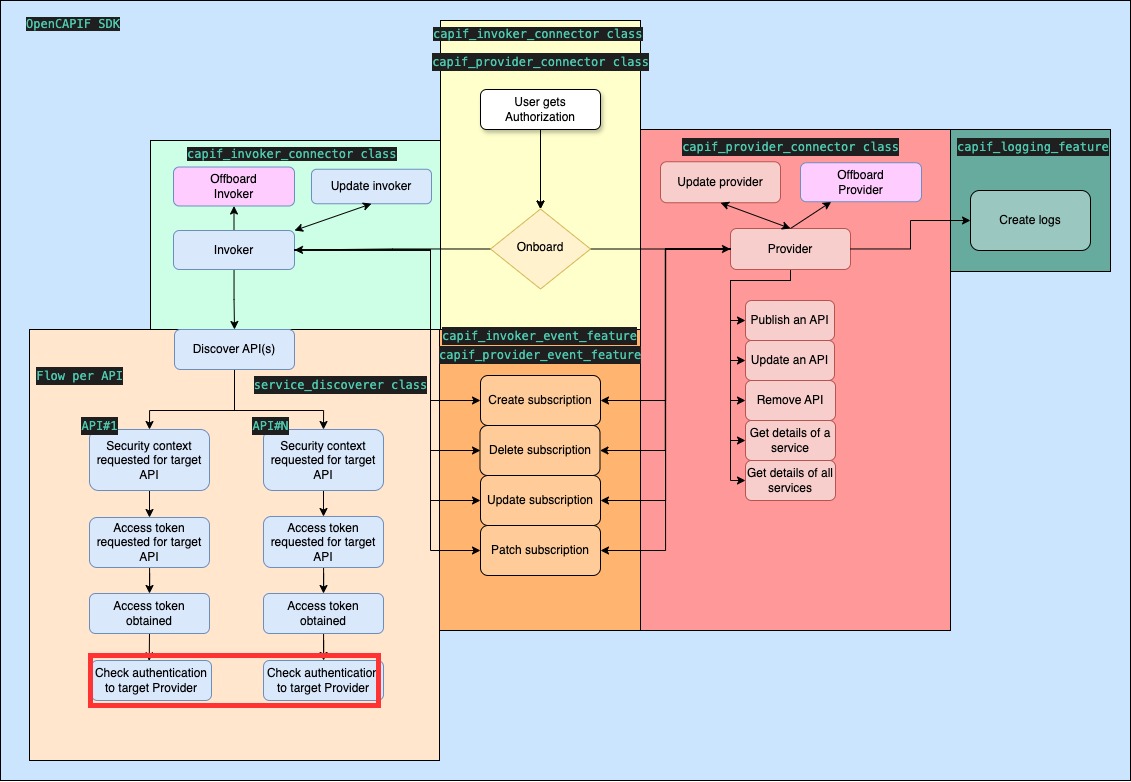
Check authentication
OpenCAPIF SDK references:
- Function:
check_authentication(supported_features, api_name, aef_id)
Asks the AEF to check the authentication of the invoker (/aef-security/v1/check-authentication) and returns its answer, with the supportedFeatures of the AEF. The communication is HTTPS with server authentication only: the AEF certificate is verified (with the CAPIF CA root by default), and the invoker sends no token or certificate.
The AEF is the one exposing the discovered API api_name (aef_id is required if several AEFs expose it). If api_name is not set, the ip and port of check_authentication_data in the configuration are used.
Required SDK inputs:
- api_name (and aef_id), or check_authentication_data
Update and Offboard Invoker
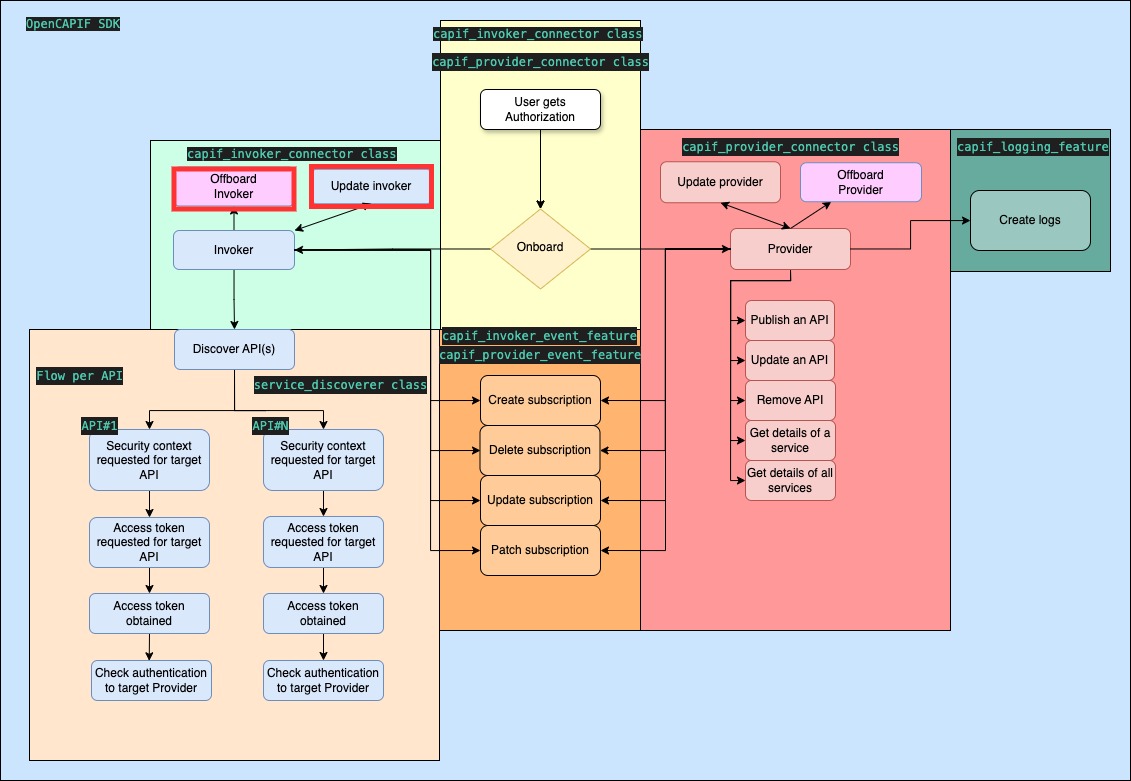
OpenCAPIF SDK references:
- Functions:
update_invoker(supp_features)andoffboard_invoker() - Scripts:
invoker_capif_connector_update.pyandinvoker_capif_connector_offboarding.py
Onboarding is required before utilizing these functions.
supp_features parameter is optional and it stands for communicating to the CCF the supported features. Its default value it's 0.
Additional Features
SDK logs
The SDK does not configure logging on its own, so its logs are not shown unless they are enabled: call enable_default_logging() to write them to logs/sdk_logs.log and to the console, or configure logging in your application. The debug_mode setting decides whether all messages or only warnings and errors are logged. More information: OpenCAPIF SDK logs.
CAPIF Registration and Login
OpenCAPIF SDK reference:
- Script:
register_and_login.py
Simplifies the login process for admin users and creates a CAPIF user.
CAPIF Deregistration and Logout
OpenCAPIF SDK reference:
- Script:
deregister_and_login.py
Simplifies the logout process for admin users and removes a CAPIF user.